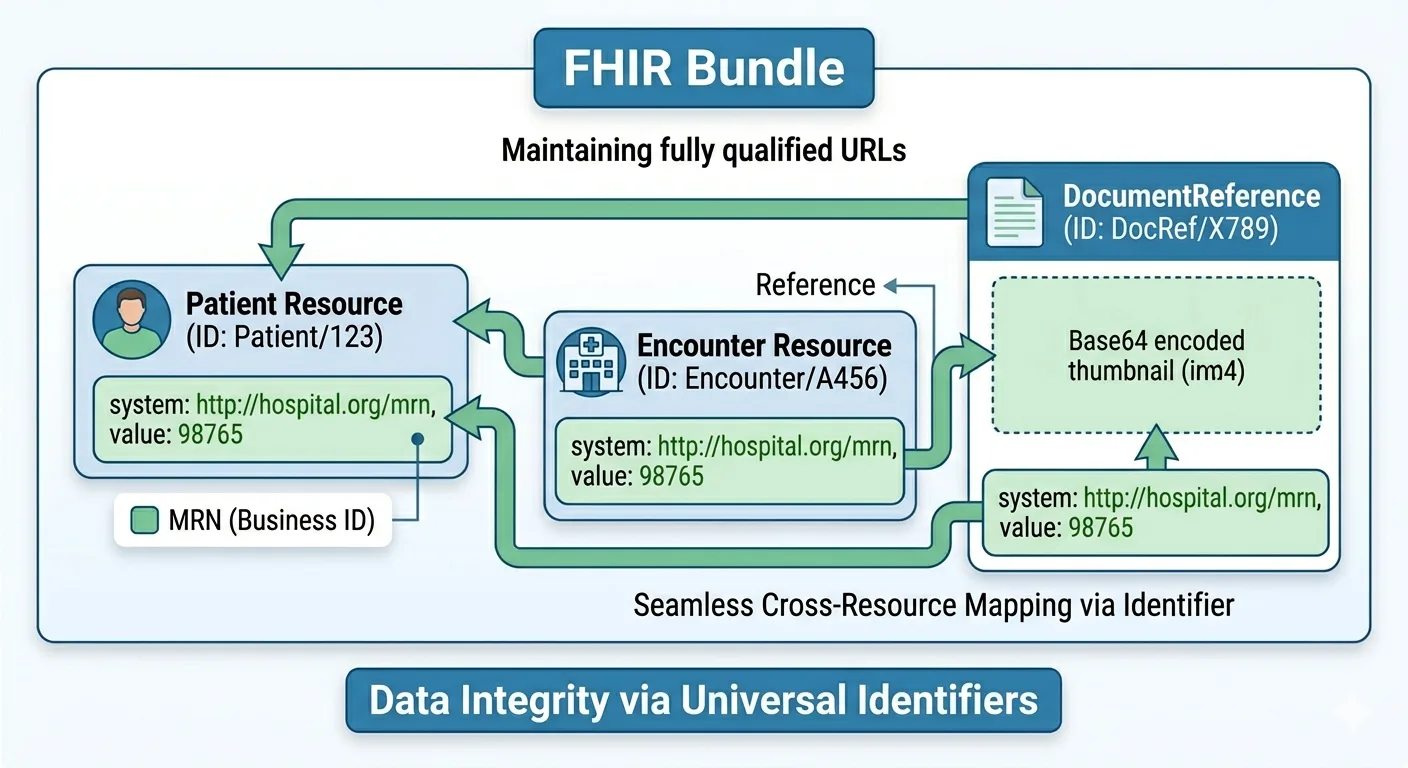
FHIR Identifiers
In modern healthcare interoperability, FHIR (Fast Healthcare Interoperability Resources) and HL7 standards enable systems to exchange healthcare information in a structured and interoperable manner. One of the most important concepts in FHIR is the use of identifiers, which ensure that healthcare resources such as Patients, Encounters, Observations, and Documents can be uniquely recognized and reliably linked across systems.
1. Understanding FHIR HL7 Identifiers
FHIR resources use two levels of identification:
- Resource ID → Internal identifier generated by the FHIR server
- Business Identifier → External identifier assigned by a business system such as an MRN, National ID, or Insurance Number
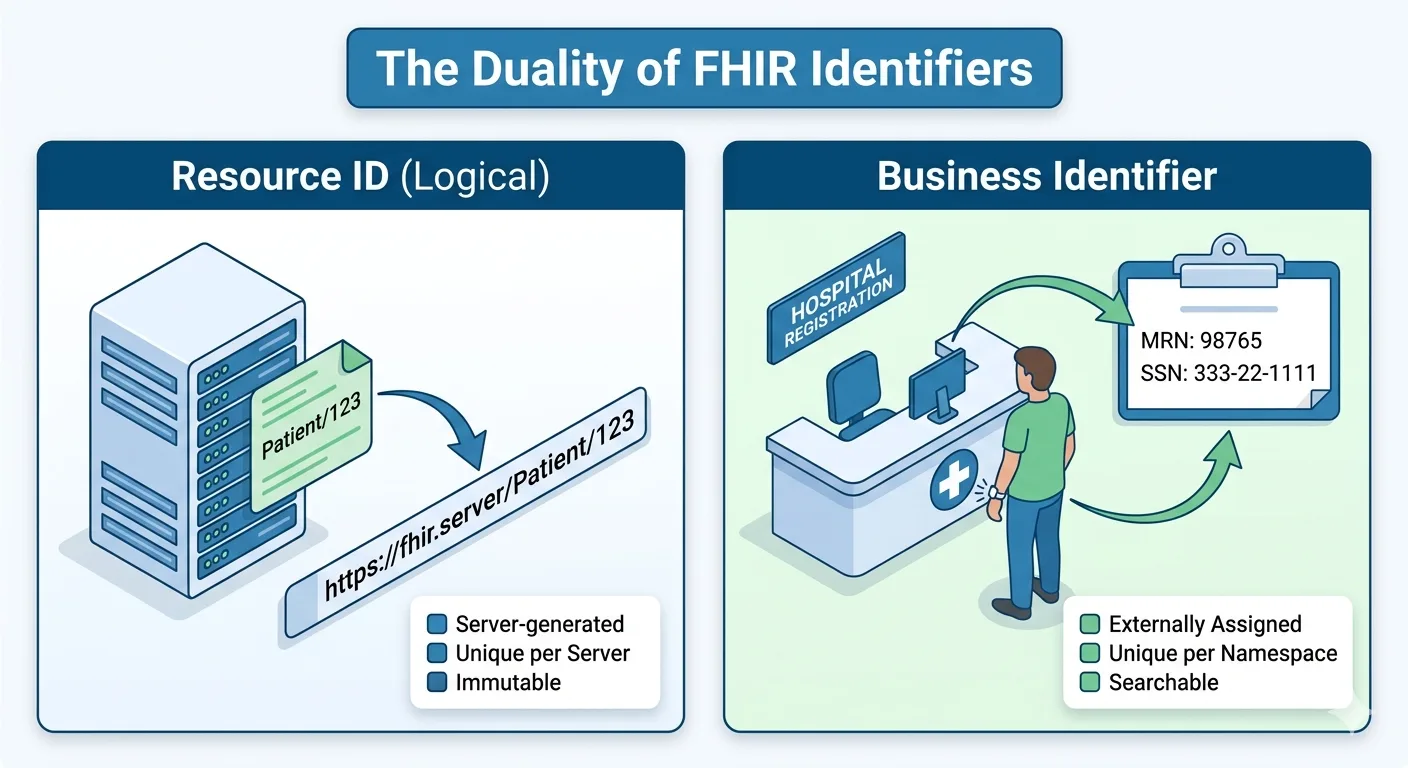
Diagram: FHIR Identifier Layers
flowchart TD
    A[Patient Resource] --> B[Resource ID]
    A --> C[Business Identifier]
    B --> D[Generated by FHIR Server]
    C --> E[Assigned by Hospital or External System]
Example Patient Resource
{
  "resourceType": "Patient",
  "id": 12345,
  "identifier": [
    {
      "system": "https://api.amakomaya.com/NamingSystem/amk-counselling-id",
      "value": "MRN-98765"
    }
  ]
}
Here:
id = 12345is the Resource IDMRN-98765is the Business Identifier
2. Resource ID vs Business Identifier
Resource ID
The Resource ID is created automatically by the FHIR server when a resource is stored.
Characteristics:
- Unique within the FHIR server
- Auto-generated
- Used in REST endpoints
- Not always meaningful outside the server
Example:
GET /Patient/12345
Business Identifier
A Business Identifier is assigned by an external system.
Examples:
- Medical Record Number (MRN)
- National ID
- Passport Number
- Insurance Number
- Phone Number
Characteristics:
- Meaningful to business systems
- Can be searched
- Used to prevent duplicates
- Stable across systems
Example Search:
GET /Patient?identifier=https://api.amakomaya.com/NamingSystem/amk-counselling-id|MRN-98765
3. How FHIR Resources Link Together
FHIR resources establish relationships using references, usually through the Resource ID.
Diagram: Patient to Encounter Relationship
flowchart LR
    A[Patient: 12345] --> B[Encounter: 67890]
    B --> C[Observation]
    B --> D[DocumentReference]
Example Encounter Resource
{
  "resourceType": "Encounter",
  "subject": {
    "reference": "Patient/12345"
  }
}
This means the encounter belongs to Patient 12345.
4. Identifiers in FHIR Bundles
FHIR Bundles allow multiple related resources to be submitted in one transaction.
Bundles often use temporary URNs to maintain relationships before Resource IDs are generated.
Diagram: Bundle Transaction Flow
flowchart TD
    A[Bundle Request] --> B[Patient Resource]
    A --> C[Encounter Resource]
    C --> D[Reference Patient via fullUrl]
    A --> E[FHIR Server]
    E --> F[Generate Resource IDs]
    F --> G[Persist Linked Resources]
Example Transaction Bundle
{
  "resourceType": "Bundle",
  "type": "transaction",
  "entry": [
    {
      "fullUrl": "urn:uuid:patient-1",
      "resource": {
        "resourceType": "Patient",
        "identifier": [
          {
            "system": "https://api.amakomaya.com/NamingSystem/amk-counselling-id",
            "value": "MRN-98765"
          }
        ]
      },
      "request": {
        "method": "POST",
        "url": "Patient"
      }
    },
    {
      "resource": {
        "resourceType": "Encounter",
        "subject": {
          "reference": "urn:uuid:patient-1"
        }
      },
      "request": {
        "method": "POST",
        "url": "Encounter"
      }
    }
  ]
}
This ensures that the Encounter references the Patient created in the same transaction.
5. Conditional Create Using Identifiers
FHIR supports conditional create, which prevents duplicate resources.
Diagram: Conditional Create Logic
flowchart TD
    A[Receive Patient Request] --> B{Identifier Exists?}
    B -->|Yes| C[Return Existing Patient]
    B -->|No| D[Create New Patient]
Example:
"request": {
  "method": "POST",
  "url": "Patient?identifier=https://api.amakomaya.com/NamingSystem/amk-counselling-id|MRN-98765"
}
This means:
- If patient with MRN exists → do not create duplicate
- Else → create new patient
This is essential for data consistency.
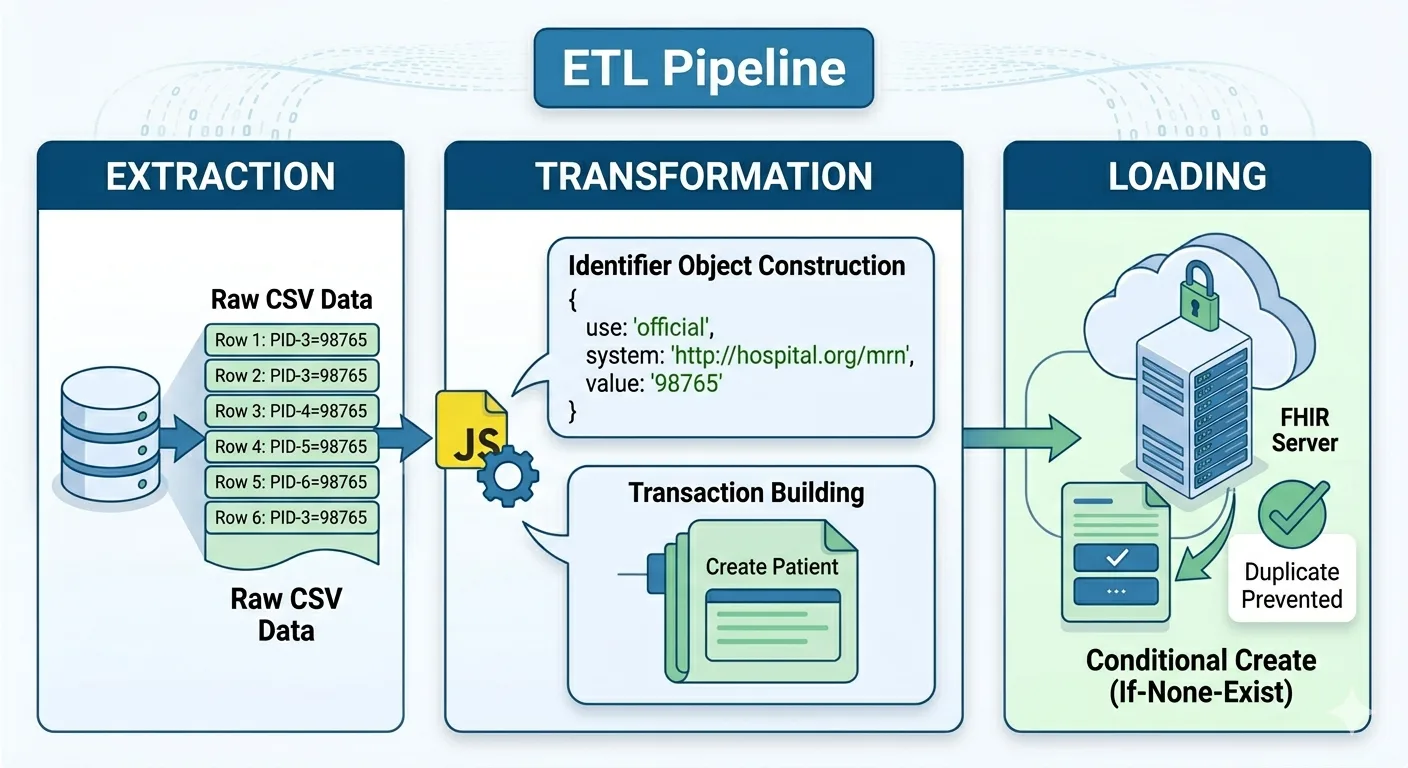
6. ETL Workflow with FHIR Identifiers
When importing data from CSV, HL7 v2, or databases, identifiers drive the transformation process.
Diagram: ETL to FHIR Flow
flowchart LR
    A[CSV / HL7 Message] --> B[Transformation Layer]
    B --> C[Map Business Identifiers]
    C --> D[Build FHIR Resources]
    D --> E[Send to FHIR API]
    E --> F[Server Generates Resource IDs]
ETL Steps:
- Extract patient data
- Map identifiers (MRN, National ID)
- Build FHIR resource
- POST to FHIR server
- Store returned Resource ID
This makes data migration and synchronization reliable.
7. Practical Architecture for FHIR Identifier Management
A healthcare integration system often involves:
- Source Systems (EMR, LIS, HIS)
- Mapping Engine
- FHIR API Layer
- FHIR Repository
Diagram: Enterprise FHIR Architecture
flowchart TD
    A[Hospital EMR] --> B[Integration Engine]
    C[Lab System] --> B
    D[CSV Import] --> B
    B --> E[FHIR API Layer]
    E --> F[FHIR Repository]
    F --> G[Patient Resource IDs]
    F --> H[Business Identifiers Index]
The Business Identifier Index enables deduplication while the Resource IDs support references.
8. Best Practices for Implementing Identifiers
Use Resource IDs for Internal Linking
Use FHIR id for references between resources.
"reference": "Patient/12345"
Use Business Identifiers for Search and Matching
Always populate identifiers:
"identifier": [
  {
    "system": "https://api.amakomaya.com/NamingSystem/amk-counselling-id",
    "value": "MRN-98765"
  }
]
Use Conditional Create
Prevent duplicates:
POST /Patient?identifier=system|value
Preserve Source IDs During ETL
Store original identifiers to support reconciliation.
Use Consistent Identifier Systems
Define systems such as:
https://api.amakomaya.com/NamingSystem/amk-counselling-idhttps://api.amakomaya.com/NamingSystem/national-id
This avoids ambiguity.